01single file
A signature. A record.
Sign one compatible file, verify its signature and timestamp, and create a detailed three-page PDF report for your release records.
Explore single-file signing
A free Windows code signing companion
You made the software. Make its publisher easier to verify. Sign Windows files through a clear, guided desktop interface.
Free for everyone · Windows x64 · Version 3.1

Bring your own Microsoft Artifact Signing account and Public Trust profile. Microsoft service charges are separate.
Good tools should be within reach.
No purchase or donation required. If it helps your next release, a coffee is always appreciated.
The right pace for your release
Sign one compatible file, verify its signature and timestamp, and create a detailed three-page PDF report for your release records.
Explore single-file signingSelect up to 50 compatible files and sign them sequentially with the same profile. Review the result of each file. Batch signing does not create PDF reports.
Explore batch signingMeet the application
For independent developers, home creators, and software teams. A familiar Windows workspace keeps the signing steps in view.
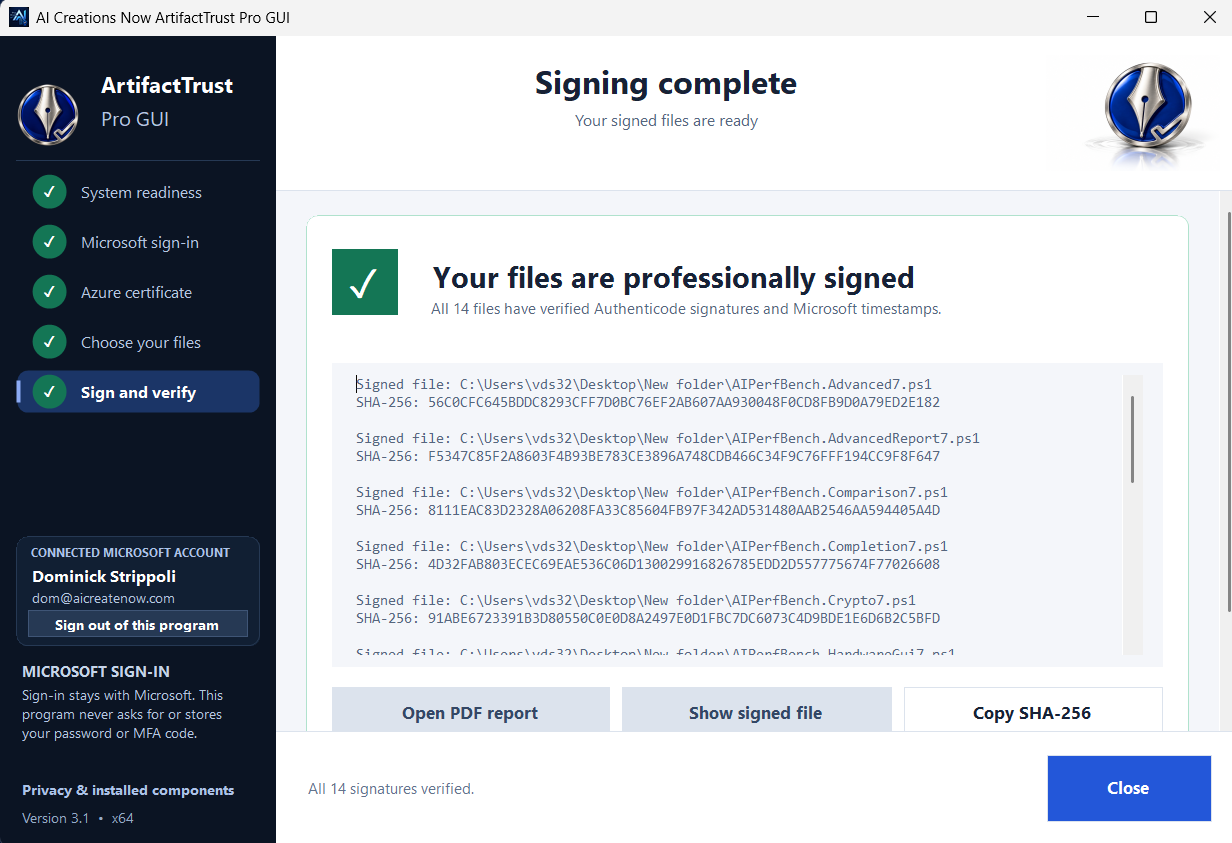
Use the certificate profile you already manage with Microsoft. The app creates a verified unsigned backup before signing, then checks the completed signature and timestamp.
Open your single-file PDF report in your preferred Windows PDF viewer to read or print it.
View the real applicationActual application screenshot. Code signing verifies publisher identity and file integrity; it does not certify that software is safe.
A considered workflow
Install the app. On first launch, accept the policy and let it prepare missing Microsoft tools from the bundled packages.
Authenticate through Microsoft and choose your existing signing account and active Public Trust certificate profile.
Choose one file or a batch. Compatible unsigned Windows files must be smaller than 4 GB each.
The app signs your files and verifies the signatures. Single-file signing also creates a PDF verification report.
See the process
Watch ArtifactTrust Pro GUI in action. Explore the actual screens, then follow the same guided steps on your computer.
Plays muted while in view. Pauses when you scroll away.
Before your first signature
ArtifactTrust Pro GUI works with your existing Microsoft signing setup. A few things need to be in place.
Read the setup guideA free tool for the work you create
ArtifactTrust Pro GUI is 100% free for everyone. No application purchase. No donation required.
Version 3.1 · Windows x64 · Your own configured Microsoft Artifact Signing account is required. Microsoft service charges are separate.
If this tool makes your release day a little easier, an optional coffee helps support our independent software work. Thank you.